
Split expenses.
Simplify tenancy.
Save time.
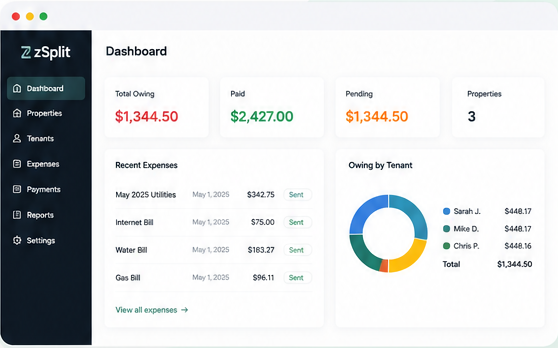
zSplit helps landlords split rent and utility costs, send payment requests, and track who’s paid – all in one place.
Add Tenants
Add your tenants and set how expenses are split – equally or customer percentages.
Enter Expenses
Enter rent, utilities, internet, or any other shared expenses in just a few clicks.
Send Requests
zSplit calculates each tenant’s share and sends professional email requests.
Track Payments
See who’s paid, who’s pending, and send reminders with one click.
Reports
View payment history and export reports whenever you need them.
BUILT FOR LANDLORDS
More organized.
Less hassle.
zSplit takes the headache out of splitting expenses with tenants so you can focus on what matters.
- No spreadsheets or manual calculations
- Professional payment requests
- Payment tracking and reminders
- More time, less stress
How zSplit Works
Set up your properties once, then manage monthly rent and utility splits in minutes.
One-Time Setup
1
Add Your Property
Create a property for each rental home, shared house, or building you manage.
2
Create Units & Bills
Add the units & bills connected to each property and decide how shared expenses are divided.
3
Add Tenants
Assign tenants to each unit and set each tenant’s responsible share.
4
Set Split Rules
Use equal splits or custom percentages for utilities, internet, and other shared costs.
STEP 2 – MANAGE EACH BILL CYCLE
Monthly Workflow
1
Enter Bill Amounts
When bills arrive, log in and enter the monthly amounts for each property.
2
Send Email Requests
zSplit calculates each tenant’s share and sends professional payment emails.
3
Track Payment Status
Payments start as pending. Once payment is received, mark the tenant as paid.
4
Send Reminders
If a payment is still pending, send a follow-up reminder with one click.
Simple, affordable pricing.
Because your time is worth more.
Starter
- 1 Property
- Up to 3 Units
- Up to 3 Tenants
- Email Requests
- No CC Required
Pro
- Up to 10 Properties
- Unlimited Units
- Unlimited Tenants
- Email Requests & Reminders
- Payment Tracking
- Reports & Export
Pro Plus
- Unlimited Properties
- Unlimited Units
- Unlimited Tenants
- Pro Features
- Rent Reminders
- Overdue Reminders
- Priority Support
Frequently Asked Questions
Everything you need to know about using zSplit.
Is zSplit automated?
Why does zSplit require manual bill entry?
Can zSplit split rent and utilities?
Can I use equal splits and custom percentages?
Does zSplit collect payments from tenants?
How are tenants notified?
Do tenants need to create an account?
Can I track who has paid?
Can I send reminders for unpaid bills?
Is zSplit only for landlords?
Can I manage multiple properties?
Does zSplit replace accounting or property management software?
Is zSplit legal advice or accounting advice?
Can I cancel anytime?
Ready to simplify expense splitting?
Join other landlords who save time with zSplit.